
Call forwarding
What is call forwarding?
Call forwarding automatically reroutes incoming calls to another number (another mobile, a landline, or a voicemail box). Useful when you don't want to miss calls while you're busy, out of coverage, or abroad without roaming.
The codes below are GSM standard so they work the same way on any operator and any handset — no app to install. Just dial them from the phone app and press call.
Activate call forwarding
Replace <number> with the full phone number (with country
code if needed, e.g. +34666...) you want to forward calls to.
- Forward when there's no answer:
**61*<number># - Forward when out of coverage or phone is off:
**62*<number># - Forward when you're already on a call:
**67*<number># - Forward ALL incoming calls (unconditional):
**21*<number>#
Dial the code and press call. The handset will show a network confirmation once the setting is saved.
Cancel call forwarding
To disable a specific kind of forwarding, dial the matching code:
- Cancel forward-on-no-answer:
##61# - Cancel forward-when-unreachable:
##62# - Cancel forward-when-busy:
##67# - Cancel unconditional forwarding (all calls):
##21#
To cancel every type of forwarding at once — without going through them one by one — dial:
##002#
As with activation, press call after dialling the code.
Check whether forwarding is active
To check whether any forwarding is currently set, dial:
*#21#
and press call. The network returns an on-screen message telling you whether unconditional forwarding is active and, if so, which number calls are being forwarded to.
If you'd rather start from a clean slate, use ##002# to
clear every forwarding setting at once (see the previous
section).
eSIM
How do you activate the eSIM?
Download our installation process guide here.
Which devices are compatible with eSIM?
Check the compatible devices with the eSIM here.
What are its advantages?

Immediate activation: you just need to scan a QR code.

Greater security and durability: with no risk of loss or damage.

Reduced environmental impact: less plastic, less logistics.
Can you use the eSIM installation QR code more than once?
No, the QR code is single-use. Therefore, if you change devices or remove the eSIM, you will need to request a new eSIM replacement and set it up again.
Can you use the eSIM and the physical SIM at the same time?
The eSIM replaces the physical SIM, so when you activate it on your device, the physical SIM will stop working.
Is there a cost for the eSIM?
No, the eSIM is free.
Visible call
How does it work?
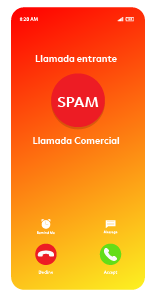
Identifies commercial or spam calls
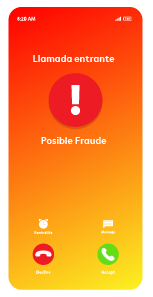
Detects potentially fraudulent calls
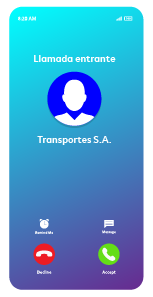
Shows you the caller's name (if registered), even if they are not saved in your contacts
What are its advantages?

More security: identify real business calls and reduce the risk of fraud.

Immediate information: the company name appears on the screen without the need to have the number saved.

Peace of mind on every call: decide if you want to answer with all the information at your fingertips.
Is it free?
Yes, it is a completely free upgrade.
Does this feature affect the privacy of your calls?
Your call privacy will not be affected by this service. The system only analyzes incoming call information, without accessing personal data.
Who can benefit from this improvement?
All customers who have a VoLTE-compatible device will enjoy this new feature automatically; you will not have to configure anything.
Are fraudulent calls blocked?
They are not blocked automatically, but you are alerted before answering.
VoLTE
How do you enable VoLTE on a device?
On most devices, VoLTE is enabled by default, meaning you do not need to activate it manually. Some models may display the option as VoLTE or 4G Calling, depending on the operating system.
What are the advantages?

HD Voice, even in noisy environments.

Instant connection, with no waiting.

Greater stability, reducing dropped calls and interference.
Greater network efficiency and optimized spectrum use, allowing for better capacity and quality of service.
Simultaneous use of voice and data.
Lower energy consumption.
Is it free?
Yes, it is a completely free upgrade, at no additional cost.
Do you need to request its activation?
No, VoLTE is already active for all customers without the need for additional configuration. The only requirement is that you have a compatible device with this technology.
Which devices are compatible with VoLTE?
All devices manufactured from 2022 onwards and updated to the latest version of the operating system.
VoWIFI
What is VoWIFI?
VoWIFI is a service that allows you to make and receive calls using any WIFI network, even when you do not have mobile coverage. It works just like a normal call and guarantees higher voice quality and stability indoors.
Indoor coverage. It allows you to make calls in areas where mobile coverage does not reach, without depending on mobile signal strength.
Better voice quality. Clearer calls without interruptions, improving the experience in crowded or noisy environments.
Available with any WIFI network. You can use it at home, in the office, at hotels, airports, or on secure public WIFI networks. It does not depend on your network operator.
No extra costs. Calls are charged the same as any mobile call included in your plan. Additionally, it does not consume mobile data; it uses the WIFI network.
What do you need to use VoWIFI?
VoWIFI will be active as long as VoLTE is active and your device is compatible. No application is needed: calls are made directly from your mobile's phone app, just like any regular call.
In what situations is VoWIFI useful?
- If you have poor mobile coverage inside your home, office, or indoor areas.
- When you are in underground locations (garages, basements, building interiors).
- If you are connected to a stable WIFI network and want to ensure voice quality.
Is there an additional cost?
No. VoWIFI calls have the same price as a standard mobile call included in your plan.
Does it consume data from your mobile plan?
No. VoWIFI uses the WIFI network you are connected to, not mobile data.
Can I use VoWIFI with any WIFI network?
Yes. It works on any WIFI network that has internet access, including in hotels, offices, or public networks (if the security settings allow it).
Do you need to activate anything on your mobile?
It depends on the device. Normally, you simply need to activate WIFI Calling from the phone settings (Android and iPhone).
How do you know if the call is being made over WIFI?
Depending on the model, your phone will display an indicator such as WIFI Calling, VoWIFI, or a phone icon next to the WIFI symbol.
What happens if an ongoing call leaves the WIFI network?
If mobile coverage is available, the call automatically switches to VoLTE to continue without interruptions.
Do VoWIFI calls sound better?
Yes. VoWIFI enables high voice quality (HD Voice) as long as the WIFI network is stable.
Can you make emergency calls with VoWIFI?
No. Your mobile phone will automatically switch to the mobile network to make emergency calls.
Can you disable VoWIFI?
Yes. You can disable the WIFI Calling option from your phone settings.
Is it safe to make calls over WIFI?
Yes. All VoWIFI calls are encrypted and follow the same security standards as a mobile call.
Does WIFI quality affect the call?
Yes. For an optimal experience you need a stable connection, a good signal and low network congestion.
Can you use VoWIFI abroad?
No. Currently, the service is only available with WIFI networks in Spain.
What phone numbers can you call?
You can call any number, mobile or landline. The person you are calling does not need to have specific applications installed, nor do they need to be connected to a WIFI network. Likewise, you can receive calls while under WIFI coverage from any number.
Can you use VoWIFI in airplane mode?
If airplane mode allows you to activate WIFI (most devices do), you will be able to use VoWIFI even without a mobile network.


